

















Skip to content

10% off your first month10% off 1st month

What would you like to host?

Run your servers from your own tools

The HelloServ client area API opens your game servers, VPS and dedicated servers to your scripts, your monitoring and your dashboards: live status, start and stop, reinstall, invoices, and server orders paid with your balance.

terminal

$ curl https://panel.helloserv.fr/api/v1/services \
    -H "Authorization: Bearer $HELLOSERV_KEY"

{"data": [
  {"id": 48213, "name": "vps-prod-1", "type": "vps",
   "product": "vpsryzen", "status": "active",
   "primary_ip": "203.0.113.24",
   "actions": {"power": true, "reinstall": true}},
  {"id": 31877, "name": "survie-mc", "type": "game",
   "product": "minecraft", "status": "active",
   "primary_ip": "198.51.100.7",
   "actions": {"power": true, "reinstall": false}}
]}

Everything you do in the panel, callable from your code

A JSON REST API over HTTPS. Each key only gets the scopes you give it.

  • List your services, their specifications and their IP addressesGET /servicesRead
  • Read the live status of a serverGET /services/{id}/statusRead
  • Start, restart or stop a serverPOST /services/{id}/powerPower
  • Reinstall a VPS or a dedicated serverPOST /services/{id}/reinstallReinstall
  • Download your invoices as PDFGET /invoices/{number}/pdfRead
  • Order a game server or a VPS with your balancePOST /ordersOrdering

The documentation also covers your account and balance, the catalog with your prices, your order history, the limits and the error codes.

Connect the API to the tools you already use

A few lines of script cover most uses. In the examples, $API stands for https://panel.helloserv.fr/api/v1 and $HELLOSERV_KEY holds your key.

Monitoring and dashboards

Show the status of your servers next to the rest of your infrastructure, in Grafana, Uptime Kuma or your in-house tool, and raise an alert when one of them stops.

supervision.sh

$ curl -s $API/services/48213/status \
    -H "Authorization: Bearer $HELLOSERV_KEY" | jq .data.power
"running"
Scripts, scheduled tasks and deployments

Restart a game server after a mod update, reinstall a test VPS from your CI pipeline, or stop a server at night with a scheduled task.

deploy.yml

- name: Restart the server after the update
  run: >
    curl -X POST
    https://panel.helloserv.fr/api/v1/services/31877/power
    -H "Authorization: Bearer ${{ secrets.HELLOSERV_KEY }}"
    -H "Content-Type: application/json"
    -d '{"action": "restart"}'

Reselling game servers and VPS

Your shop orders the server with your balance, at the client area price, then hands it to your customer with its IP address. You set your own prices.

commande.sh

$ curl -X POST $API/orders \
    -H "Authorization: Bearer $HELLOSERV_KEY" \
    -H "Idempotency-Key: commande-1042" \
    -H "Content-Type: application/json" \
    -d '{"type": "minecraft", "offer_id": 2, "period": "monthly"}'

Agencies and server fleets

Manage your customers' servers from your operations tool, with one key per project, and fetch the PDF invoices every month for your accounting.

factures.sh

$ curl -s "$API/invoices?per_page=100" \
    -H "Authorization: Bearer $HELLOSERV_KEY"
$ curl -o INV-2026-001234.pdf \
    $API/invoices/INV-2026-001234/pdf \
    -H "Authorization: Bearer $HELLOSERV_KEY"

One key per tool, with its own scopes and addresses

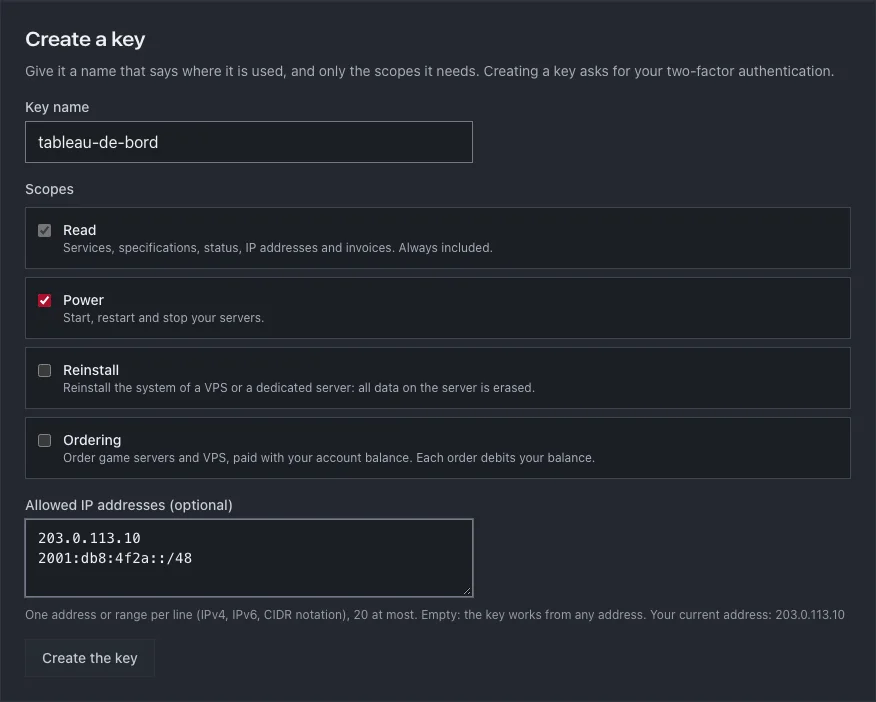
Keys are created in the client area, under My Profile then Security. Two-factor authentication is required to create one, and each key is shown only once.

API key creation form in the HelloServ client area, with the Read, Power, Reinstall and Ordering scopes and the allowed IP addresses field
Creating a key: a name, the scopes ticked one by one and the allowed IP addresses.
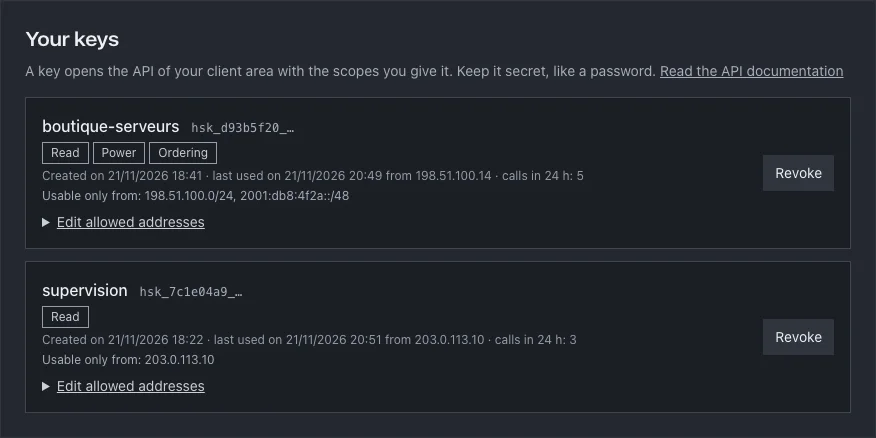
Two API keys in the client area with their scopes, their last use and their allowed IP addresses
Each key shows its scopes, its last use and the addresses it is accepted from.
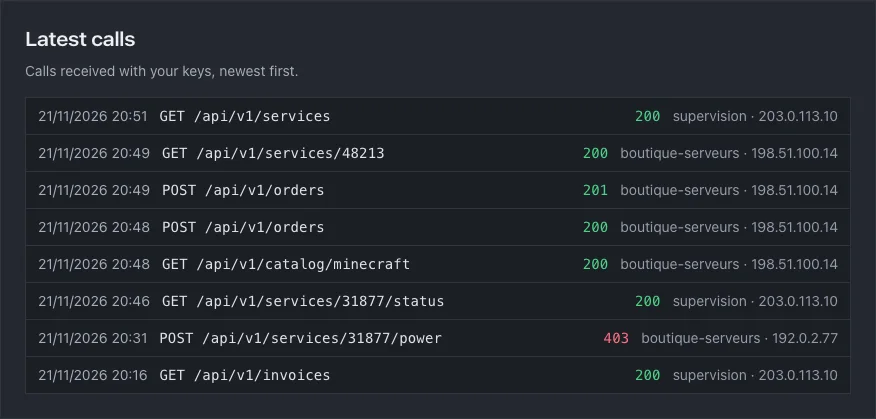
Log of the latest API calls with the route, the response code, the key and the IP address
The latest calls, refusals included: a call from an address that is not allowed is rejected and shows up here.

Order servers with your account balance

Prices, VAT and the invoice are the same as in the client area, and the server is delivered in 60 seconds.

  1. 01Top up your balance from the client area and create a key with the Ordering scope, which is never ticked by default.
  2. 02Read the catalog: the offers on sale and their prices for your account, VAT included.
  3. 03Ask for a quote with dry_run: the exact price, without ordering anything.
  4. 04Place the order with an idempotency key: sent twice, it is placed only once.

terminal

$ curl -X POST https://panel.helloserv.fr/api/v1/orders \
    -H "Authorization: Bearer $HELLOSERV_KEY" \
    -H "Idempotency-Key: commande-7f3a9c21" \
    -H "Content-Type: application/json" \
    -d '{"type": "vpsintel", "offer_id": 3,
         "period": "monthly", "os": "debian12"}'

{"data": {
  "order": {"id": 42, "status": "paid"},
  "invoice": {"number": "INV-2026-001234", "status": "paid",
              "total": 9.60},
  "services": [{"id": 5678, "name": "vps-2", "status": "pending"}],
  "balance": 40.40
}}

Documentation with an example for every route

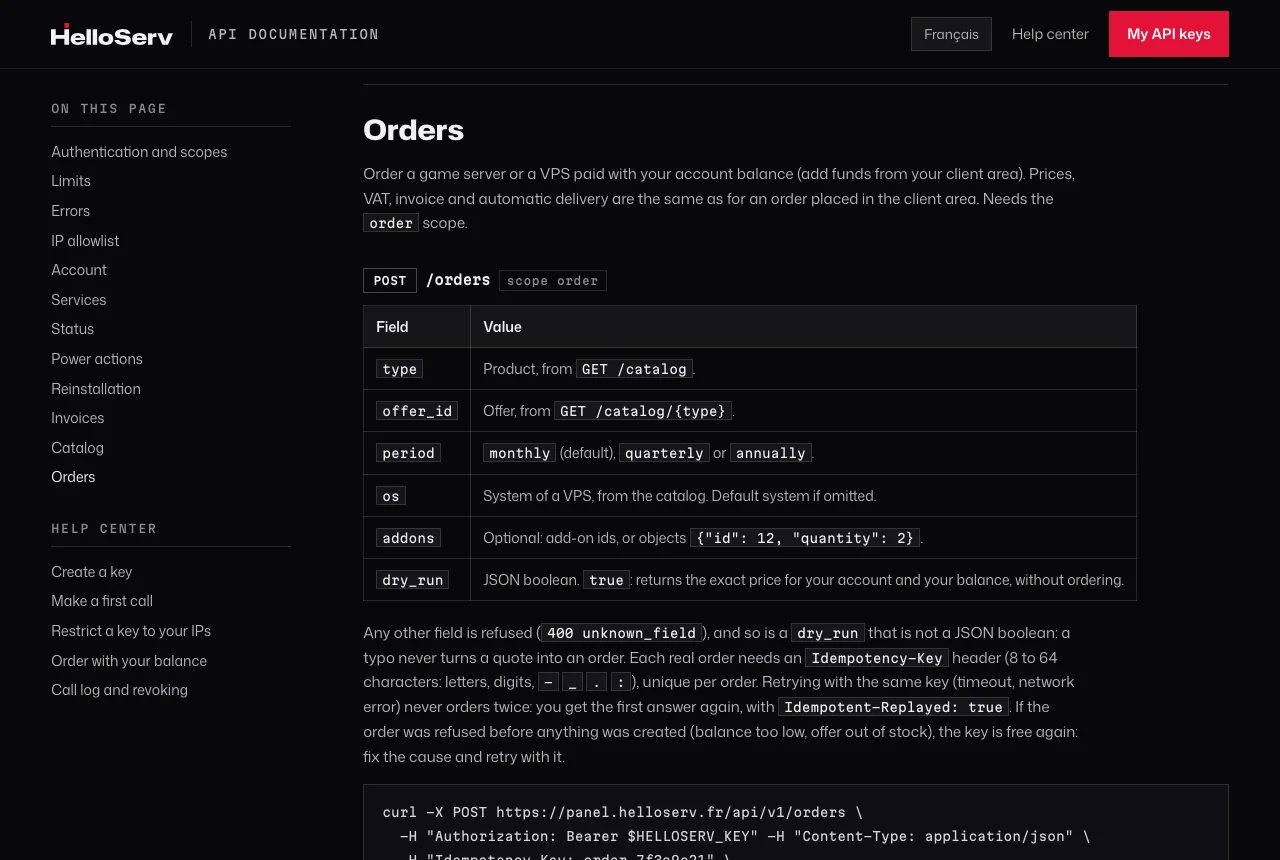
Every route comes with its curl request and its response. The help center walks you through creating a key, restricting it to your IP addresses and placing a first order.

HelloServ API documentation open on the Orders section

Questions about the API

Help center Write to us

Does the API cost extra?
No. It is part of the client area and works with all your services.
Which services can I manage?
Game servers, VPS and dedicated servers. Status and power work for all three; reinstalling applies to VPS and dedicated servers.
Can I order a dedicated server through the API?
Not yet: the API orders game servers and VPS. A dedicated server is ordered from the website or the client area.
How do I protect a key?
Give it only the scopes it needs and restrict it to your servers' IP addresses, up to 20. If it leaks, revoke it from the client area: it is refused at once.
Are there any limits?
120 requests per minute per key, and 10 orders per day with the same key. Beyond that, the API answers with code 429 and the time to wait.

Your server runs 60 seconds after payment.

Pick your plan, pay online: the server sets itself up.